Get past the dead end.
On work that earlier AI use could not resolve, investigation, fixes and verification move forward.
LMR / FIELD OBSERVATION LINE MEDIA RESEARCHINDEPENDENT R&D / JAPAN
PRIVATE AI / BUILT FOR YOUR R&D
What happened on LMR’s own dev floor.
Did you knowthat can happen?
Room to think and to verify, for the hard work.
Dedicated GPUs, engineering knowledge and execution tools together
carry work that stalled on cloud AI to its next stage.
A description based on LMR’s own experience in operation. Results depend on the task, model and settings, and this is not a claim of superiority on all tasks.
What we measure is how far the work actually gets.
Task completion / human rework / time to verificationWhat caught LMR’s attention was not how well it converses, but how far real development gets. From our own operation, we feel these changes.
On work that earlier AI use could not resolve, investigation, fixes and verification move forward.
LMR / FIELD OBSERVATIONIn crawler development it surfaces points we used to miss, such as gaps in collection or processing.
LMR / FIELD OBSERVATIONBy searching past conversations and know-how from other work, it can supply conditions that were never spelled out.
LMR / FIELD OBSERVATIONObservations based on the owner’s operational reports. Not a controlled comparison that isolates cause, nor a measured performance multiple.
A flat-rate shared service must balance compute cost, latency and the throughput of all its users. With your own equipment, you decide the compute and time given to one important piece of work.
SHARED SERVICE
Compute is allocated with the demand and cost of all users in view.
DEDICATED INFRASTRUCTURE
Inference, exploration and verification continue according to your priorities.
What to compare is the sustained
budget of compute, trials and verification a task can draw on.
A consideration and conceptual model drawn from business structure. Each provider’s GPU allocation is undisclosed, and an average per user is not the same as the GPU scale used for a single inference. Dedicated contracts differ in their terms. [R4]
Even for the same model, there are settings that tune speed, cost and the depth of the response. Maximum reasoning and verification on every task is not necessarily the default.
OPENAI / REASONING EFFORT
The official API docs explain that a low effort setting favors speed and fewer tokens. Higher reasoning settings can also be chosen.
Read the official docs ↗ANTHROPIC / EFFORT
The official API docs describe trading cost and speed against thoroughness, and note the effect of low effort on capability and a reduction in tool calls.
Read the official docs ↗Official docs reviewed on 16 November 2026. These are published API specifications; they do not prove any app’s internal settings or the cause of a particular failure. They show the trade-off between compute and quality.
Try a hypothesis. Read the failure. Look for another way. Fix it, and go through to regression tests.
On hard work, this iteration decides the outcome.
Time, tokens, iteration limits
Investigate alternatives, run tools
Fix, retest, completion check
Only candidate causes offered
partial fix, left unverified
Alternatives verified, fixes with evidence
on to retest and completion
“Look again,” “try another way,” “check after fixing.” Dedicated GPUs combined with execution and evaluation.
A shortage of compute or execution budget can be one cause of unsolved work. But model capability, instructions, knowledge, tools and evaluation method also shape the result. Long reasoning or large equipment alone do not guarantee better performance. [R1–R3]
Think, look things up, remember, try and fix.
Run this whole chain of work in one environment.
Model × compute environment
× knowledge × execution & verification
Allocate inference time and parallelism by your own priorities.
Past decisions, failures and reasons for fixes, referenced via RAG.
Access to code, the web, images and tests.
Check the results and feed them into the next fix.
How far to push your own research.
Keep that decision, and the environment to act on it, in your own hands.
Your research plan is less at the mercy of blanket limits or quotas on external AI services.
Design the model, tools, execution permissions and update timing around your research goals.
No per-token metering on local inference. Plan the budget for iteration within equipment, power and operating costs.
This freedom means deciding operating policy for yourself. Model and software specifications and legal or contractual terms still apply. If you also use an external API, its fees apply separately.
Web collection, maintenance work, image understanding, continuous improvement — and AI-driven penetration testing. From one shared AI base to a system for each job.
PENTEST / DEVELOPMENT EXAMPLE
On your own systems, or an environment you were asked to assess, it links test planning, execution, evidence and fix support. Form a hypothesis, verify, and check once more after the fix.
An example of a system we could build. The features of each theme are designed to your requirements.
WORKFLOW / CONCEPT
Test records / evidence-backed report / fix proposals / retest results
A configuration based on LMR’s equipment. For your site, it is designed around the target model and the number of concurrent users.
Launcher / IDE / CLI
Authentication & access control
management / execution traffic
DELL / POWEREDGE XE9780
Four assigned to a local GLM-5.2
The use of the remaining four is not specified in this diagram.
Code / models / RAG
logs / verification artifacts
VLM / search / test execution
placement set by the workload
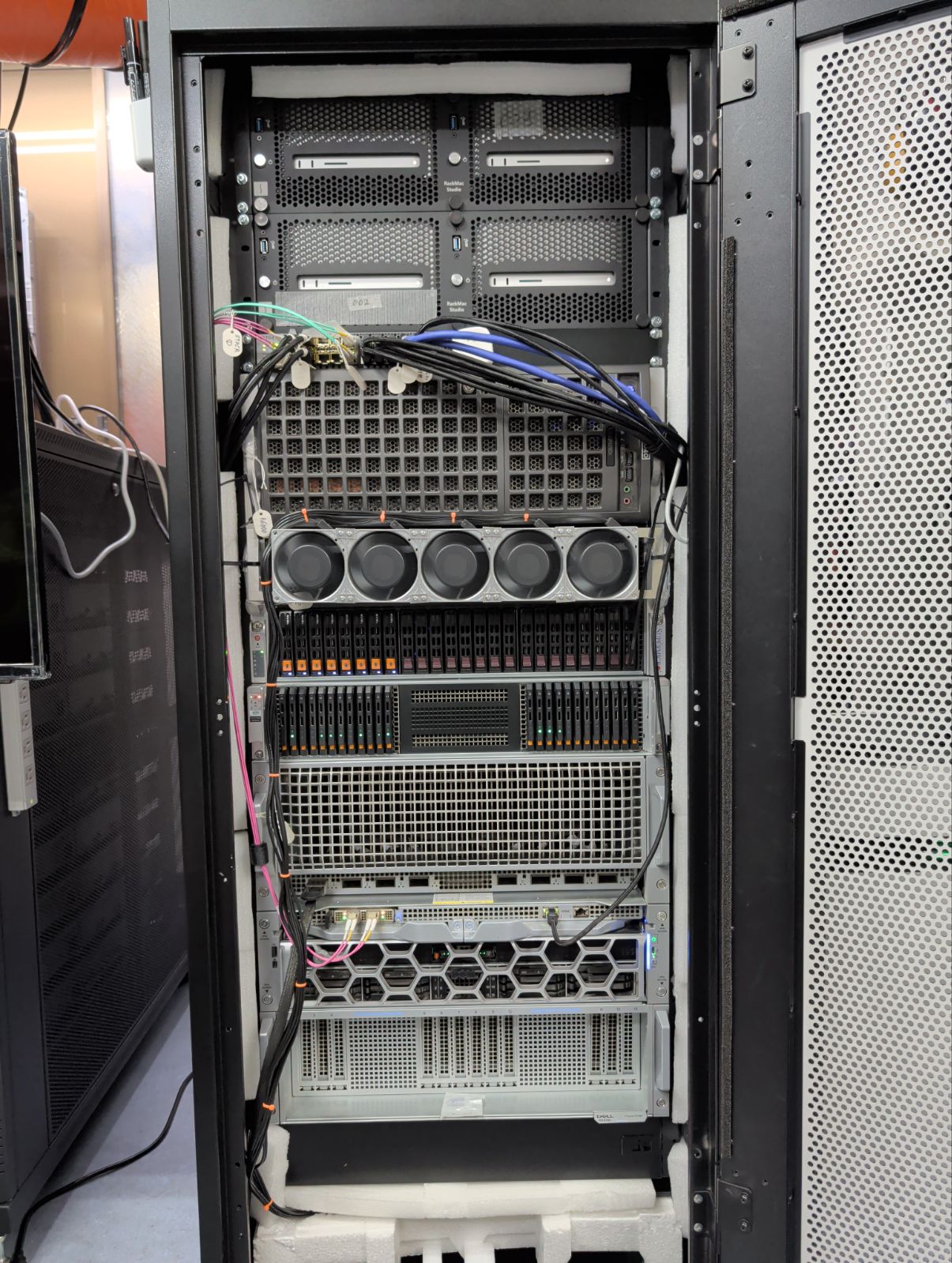
A100 × 8 / A6000 × 2 / Mac Studio M3 Ultra 512GB × 4
A schematic based on the equipment described in the source document. It does not show actual wiring or the placement of all software, and it is not a statement of any partnership, certification or sales agreement with Dell or others.
Connect the model, the execution environment and where knowledge is kept. Search for what is needed, confirm it with tools, and feed the result into the next inference.
01 / WORKSPACE
Pick a project and settings
Planning / tool calls / checking results
the entry point for work today
02 / LOCAL INTELLIGENCE
GLM-5.2 / four B300s
Calls the functions needed and
returns observations to the next inference
03 / KNOWLEDGE & TOOLS
Past conversations / know-how / evidence
Understanding images and screens / web collection
the VLM connects via MCP
Git / CI & test environments / job management / permissions & approval / monitoring & audit logs / registering verified knowledge into RAG
A logical configuration based on current operating elements. The API translation layer, the RAG search path and the compatibility and terms of third-party software are confirmed per configuration, and the execution layer is designed to be replaceable.
What to check, where it failed, why that design. Knowledge drawn from past conversations, delivered in a form usable in today’s work. Even without updating model weights, the experience it draws on can be grown.
Instructions, reasons for fixes
the story of successes and failures
Conditions and evidence
confidentiality class and expiry
Narrow to the knowledge
that fits the task at hand
Confirm the result and
update the usable knowledge
Not just stuffing in knowledge, but designing which task it serves, and when.
With round-the-clock operation in view, trial, evaluation and re-execution are automated. Before telling the AI to “just make it better,” we build the criteria to confirm it actually did.
If improvement stalls, it records why and hands off to a person.
Collection rates are compared on a fixed set of test URLs. Per-site load limits and regression tests for existing features are maintained.
Goal, budget, stop conditions
Study the failure logs
Implement a candidate
Adopt / retry / stop
Check with fixed tests
01 → 02 → 03 → 04 → next hypothesis
Promotion to production follows the approval conditions you set.Compare not just by model name but with knowledge, tools and work budget matched. A task that is stuck now becomes the starting point for evaluation.
Record how far it gets with your usual model, settings and quota.
With the same model, widen the reasoning, output and execution budget and see whether it improves.
On the same task, RAG and tool conditions, measure completeness and the effort required.
Completion rate / undiscovered defects / regression tests / human rework / time taken / total cost
A proposed comparison plan. B is evaluated within what the service allows you to change. Because different models also bring differences in model capability, the effect of RAG and compute budget is checked under separated conditions.
LMR is a lab with its own compute equipment and development work. The operational instincts gained there carry into your work. Equipment, software and knowledge base are designed as one development environment.
Agree the task to solve and the pass conditions.
Combine GPUs, model, RAG and tools.
Set up usage, maintenance, updates and evaluation.
Performance varies with the task, model, reasoning settings, RAG, tools and execution budget. The wording on this page is based on LMR’s own experience in operation. On your real work, we compare completion rate and the effort required.
Inference on a local model you run yourself has no per-token cloud-API metering. Equipment, power, maintenance and operating costs do apply. If you combine an external API or another paid service, each has its own fees.
We consider a configuration that organizes conditions, evidence and confidentiality class, and searches RAG for knowledge that fits the task at hand. Managing the freshness and quality of that knowledge, and updating it from execution and verification, is key.
We design a configuration that connects your launcher, IDE or CLI to the local inference API. Model-connection compatibility and each tool’s terms are checked individually, and the execution layer is reselected as needed.
It is designed from the target model, quantization, context length, number of concurrent users, response speed and the continuous workloads to run. The B300 configuration shown is LMR’s own example and does not require the same equipment of every customer.
Bring us one piece of work that is stuck right now.
How far local AI can carry it forward —
we check it together, against the real task.
What we ask in a consultation: what you want to build / where you are stuck / number of users / data to keep in-house / existing compute equipment
This page is based on “LMR Local AI Platform, web-page draft (revised)” (16 November 2026). It distinguishes operational experience, published specifications, conditional considerations and development proposals.
Official docs reviewed on 16 November 2026. They explain the technical background of shared inference and the tuning of reasoning volume; they are not proof of any specific provider’s GPU allocation, nor of a practice of deliberately leaving tasks unfinished.